HIPAA-Conscious Design: UX Patterns for Products That Touch Health Data

Featured in more than 15 major media publications, including Forbes, Wired, Yahoo Finance, AP and Telemundo, Mr. Ortiz brings more than 25 years of experience to product design and digital growth. His record includes 172 managed projects and 1.52 million happy customers. Top 100 Magazine named him to its Top 100 Innovators in US list, and he owns one US utility patent with a CIP. His healthcare client experience spans Medicare Advantage providers, a global pharmaceutical company, a federal healthcare program and digital health startups.
Healthcare products earn trust through more than security controls and privacy notices. Their interfaces must make data choices understandable, restrict exposure to what a task requires, and show users what happens after they act. Mr. Ortiz brings a data-driven approach to these challenges, connecting product strategy, UX/UI design and implementation decisions.
About
HIPAA-conscious design turns privacy and security requirements into visible product behavior. It does not mean that a particular interface pattern guarantees compliance. HIPAA obligations depend on the organization, its role, the information involved and the way the product is used. The interface is one layer of a broader program that includes policies, technical safeguards, risk management and operational controls.
The HIPAA Security Rule requires covered entities and business associates to protect electronic protected health information through administrative, physical and technical safeguards. HHS describes access controls, audit controls, authentication and transmission security among the rule’s standards. A design team cannot replace those controls with a polished UI. It can make them easier to follow and harder to bypass.
For product leaders, the central question is practical: does the interface help people share, view and communicate health information in a deliberate, accessible and traceable way?
Facts
- Consent should be specific and understandable. A single “I agree” screen can obscure what information is shared, with whom, for what purpose and through which channel.
- Minimum data belongs at the point of use. An interface should not display or transmit sensitive fields that are irrelevant to the task.
- Auditability has a user-experience dimension. Systems need reliable records of relevant activity, while staff and users need the right level of visibility into important actions.
- Accessibility supports safer task completion. An inaccessible login, consent flow or message composer can prevent people from exercising choices or completing essential tasks.
These are design principles, not stand-alone legal determinations. HIPAA does not prescribe one consent screen, message layout or visual style for every product.
1. Design consent as a clear, reversible choice
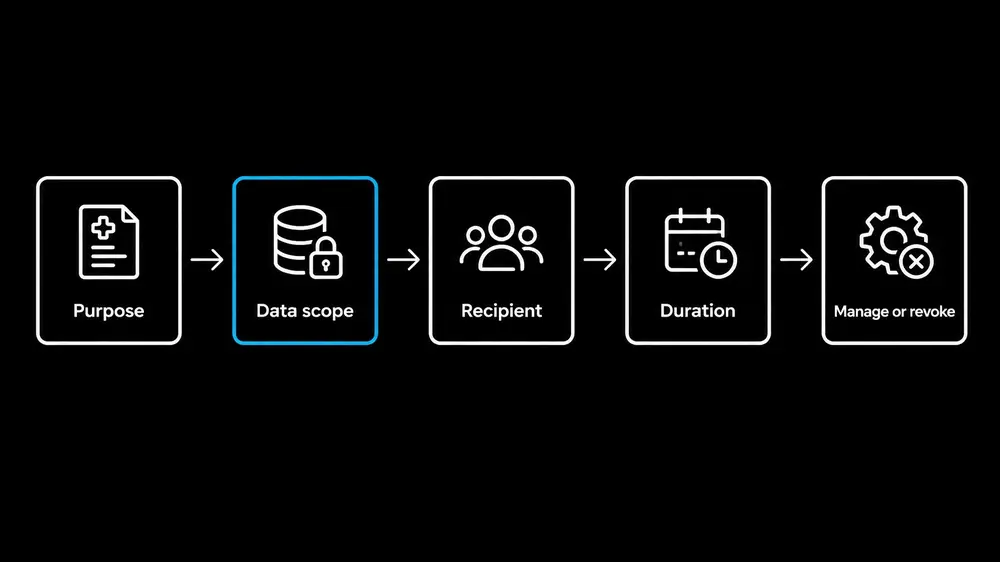
A useful consent flow explains the decision before asking for it. It identifies the data involved, the purpose, the recipient or recipient category, the channel and any relevant duration. If the user declines, the interface explains what that choice changes. If the user grants permission, a clear path remains for reviewing or changing applicable preferences.
Separate choices that serve different purposes. Treatment-related communication, caregiver or proxy access, third-party data sharing and optional research or marketing should not be bundled into one generic control. A service’s terms and a HIPAA authorization are not interchangeable; the product’s legal and privacy teams determine which permissions apply.
Consent interfaces also need to reflect the system behind them. A versioned record can capture the notice presented, the choice made, the time of the action and any later change or revocation. The user-facing experience can show a simple history without exposing unnecessary internal security details.
2. Minimize data in every interface layer
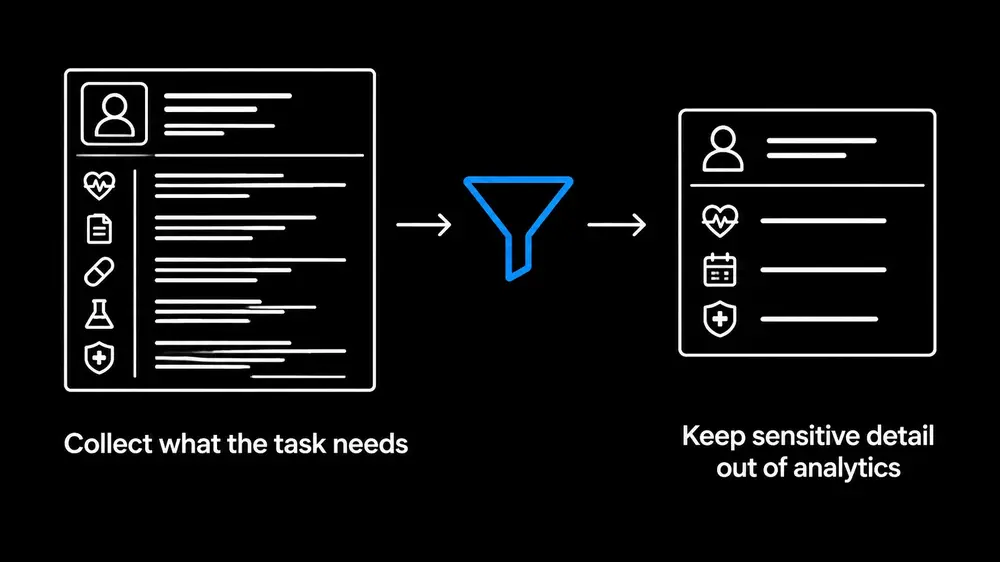
Data minimization extends beyond the visible screen. Health information can appear in analytics events, URLs, notification previews, browser titles, application logs, crash reports, exports and third-party tools. A product team needs an inventory of those pathways, not just a review of its main forms.
A purpose-specific screen should reveal only what the user needs for the current task and role. Masking, scoped identifiers and role-based views can reduce unnecessary exposure. Analytics events should describe product behavior without carrying full medical details when those details are not essential to the analysis.
HHS’s guidance on online tracking technologies warns that data collected through authenticated health portals and mobile health contexts may include protected health information. Product teams should assess trackers, SDKs and vendors in context, then align data flows with privacy, security and contractual requirements. A field disappearing from the screen does not mean the data has disappeared from the system.
3. Make secure messaging patterns visible
When a product supports messages containing health information, the interface should make the recipient and channel clear before sending. An authenticated in-app inbox gives the product a controlled place for protected content. Email or SMS notifications can be designed to say that a message is available without revealing a diagnosis, result or treatment detail in the notification itself.
The composer can show the selected recipient, channel and any relevant consent or proxy status. If a user chooses a channel that is not permitted for the content or workflow, the product should explain the issue and offer an appropriate route. Safe attachment handling, recipient verification and session controls belong in the overall design and security review.
These controls must match the actual architecture. A product should not claim “end-to-end encryption” unless its implementation supports that claim and the organization can explain its limits. HHS guidance addresses electronic communications and the importance of safeguards; organizations should assess each communication context rather than treating every channel as equivalent.
4. Turn audit trails into accountable workflows
An audit trail is more than an administrative log. It is a record that supports oversight of sensitive activity and helps teams investigate access or workflow issues. Relevant events may include viewing, exporting, sharing or messaging information, as well as changes to permissions and consent.
Useful records connect an action to an actor or service, a resource, a time, an outcome and the applicable workflow or policy context. They should avoid storing unnecessary sensitive payloads. Access to logs, retention and review procedures belong in the organization’s security and privacy controls.
The interface also needs to communicate important outcomes. Clear confirmation after a permission change or message send helps prevent repeated actions and uncertainty. Where a user-facing history is appropriate, it can summarize meaningful events without disclosing details that create additional risk.
5. Make accessibility part of the privacy control
A privacy choice is only meaningful when people can perceive and complete it. An ADA compliant website design and accessible mobile experience need clear labels, keyboard support, visible focus, understandable errors and controls that work with assistive technology. Accessibility must be tested in the real consent, authentication and messaging flows, not inferred from a checklist alone.
WCAG 2.2 includes an Accessible Authentication criterion that addresses cognitive tests during login. The W3C guidance explains that password managers and paste support can reduce the burden of remembering or transcribing credentials. An accessible authentication flow can preserve strong security while offering workable methods for people with different access needs.
Accessibility also belongs in a UX audit and in ongoing product validation. Teams can test with screen readers, keyboard-only navigation, zoom, mobile devices and representative users. A product design consultant can help translate findings into prioritized interface changes, while UX UI design services can connect those changes to a broader digital product strategy. A UI UX agency or internal product team can then validate that the design works across platforms and workflows.
Skills
Mr. Ortiz combines strategic and hands-on product work across regulated, complex environments. His skill ratings include:
- UI/UX design: 95%
- Product management: 95%
- Business acumen: 90%
- ADA compliance: 90%
He applies these capabilities to product research, prototyping, usability evaluation and implementation planning. His approach connects accessibility, privacy and security requirements with measurable product decisions. The result is a more deliberate design process, not a substitute for legal, clinical, privacy or security review.
A practical release review
Before release, teams can review the product’s data flows and vendors, confirm that consent states produce the expected behavior, test recipient and channel controls, inspect audit events, and check that sensitive information does not leak into analytics or notifications. Manual accessibility testing and security, privacy and legal reviews should accompany automated checks.
Benchmarks such as WCAG 2.2 AA can guide evaluation, but they do not guarantee legal compliance or usability for every person. The right release criteria depend on the product’s users, risks, intended use and operating context.
This article is educational and is not legal or medical advice. Organizations can get help with a UX audit, accessibility, consent-flow design, secure messaging patterns and product improvement. More product-design perspectives are available in the article library.
References
• Summary of the HIPAA Security Rule: HHS
• Use of Online Tracking Technologies by HIPAA Covered Entities and Business Associates: HHS • Understanding WCAG 2.2 Success Criterion 3.3.8: Accessible Authentication (Minimum), W3C
• Applying Human Factors and Usability Engineering to Medical Devices: FDA


